Background
Generally, the accepted program for determining future year turning movements is TURNS5-V2014. It is used to develop future year turning movements based on one of two methods. The first method allows for the user to enter an existing year AADT and specify simple growth for three other periods (normally project opening, mid-design, and design years). The second method allows for the user to input an existing year AADT and model forecast year AADT. The program will then interpolate or extrapolate for two other periods. It provides output of AADTs and DHVs and allows for comparisons and smoothing to ensure that the user is producing reasonable results.
TURNS5-V2014 was developed as a tool for the estimation of future turning volumes. TURNS5-V2014 is an Excel template which was developed by merging two other programs in use by several FDOT districts and creating a user-driven menu and “file folder” windows for easier use. TURNFLOW¹ and TURNS² form the basic framework of the TURNS5-V2014 program.
TURNFLOW is an Excel template that provides a spreadsheet structure for estimating intersection turning movements when only approach volumes are known. The spreadsheet uses a technique for solving and balancing turning movement volumes based on an initial estimate of turning proportions entered by the user. The program iteratively balances volumes until a minimum tolerance is reached. This procedure was developed by E. Hauer, E. Pagitsas, and B.T. Shin³. TURNFLOW and its documentation can be obtained from the McTrans Center of the University of Florida. It should be noted that the software is copyrighted and the TURNS5 program creators have secured its use for FDOT.
2 TURNS3, developed by FDOT, District 1, 801 Broadway Avenue, Bartow, Florida 33830
3 Estimation of Turning Flows from Automatic Counts," Transportation Research Board, Record No. 795, 1981
TURNS5-V2014 combines the intersection balancing component of TURNFLOW with the same basic setup relating to output, menu options, and format similar to TURNS3. TURNS3 provides estimates of intersection turning movements and produces traffic volume outputs in a format suitable for use in various traffic analysis reports associated with preliminary engineering, planning, and Design studies.
TURNS5 Methodology
TURNS5-V2014 is designed to develop future turning volumes based on AADT volumes for the existing year and growth rates, or by using an existing year AADT and a model year AADT. When using a model year, the program can calculate (interpolate/extrapolate) AADT for project years (normally opening, interim, and design years). The program will also develop AADT volumes for three future years based on the existing year volumes and user-specified growth rates for each projection year.
The TURNS5-V2014 program will project future year AADT volumes and balance each year’s future turning movement distribution based on an initial guess of turning percentages for each approach. Each year requested will be balanced using these initial guesses. It is recommended that the user input for these percentages be based on actual approach counts for the intersection. If existing turning movement counts are not available, the TURNS5-V2014 has two other “first guess turning percentages” methodologies available: Existing Year AADTs or FSUTMS Model Year AADTs. These methodologies utilize the AADTs input by the User.
It is important to note that the accuracy of predicted volumes is a function of the implied accuracy of user inputs. Existing and model year AADTs should be closely evaluated and checked for consistency with actual or proposed conditions for the roadway system under evaluation. Traffic counts should be checked for reasonableness of volumes and evaluated to identify vehicle flows into and out of the system for the existing condition. Reasonable assumptions for the model year must also be determined by the user. Random input of unchecked volumes or turning percentages will lead to program errors (turning movement balancing) or unrealistic output values.
In addition to this Handbook, TURNS5-V2014 has a companion Tool Documentation that explains the inner workings of TURNS5. It provides more details on each tab and what the ‘Run Turn Counts Macro’ button really does. The following text will serve as a User’s Manual and should be sufficient for normal use of TURNS5-V2014.
TURNS5-V2014 Spreadsheet Tabs (Worksheets)
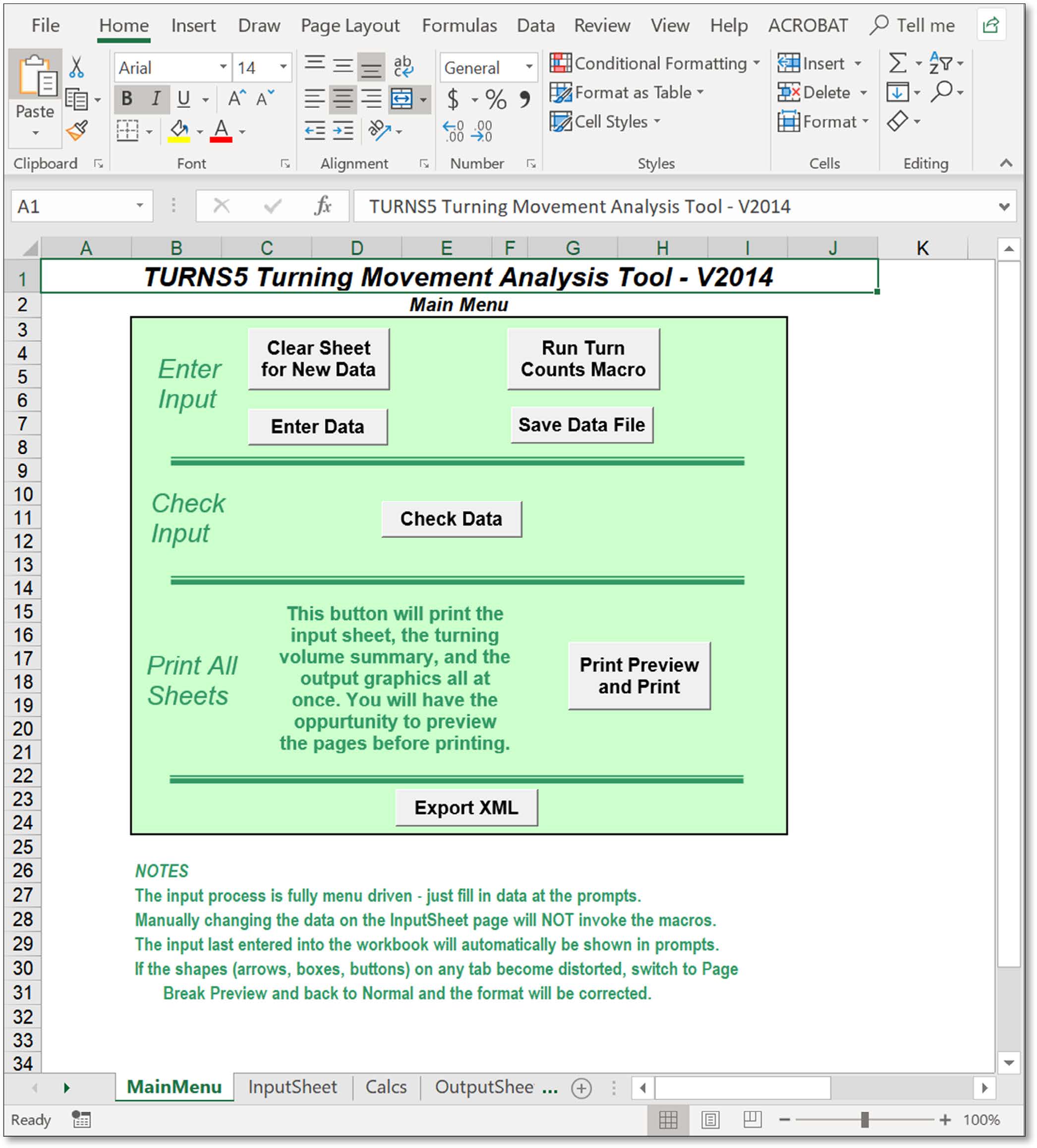
Upon loading the program in EXCEL, the program will automatically be positioned at the main menu (MainMenu tab) as shown in Figure 7-1. The following tabs are contained within the workbook:
However, if any information is changed by manually entering values into the tab or using the "Enter Data" menus, the "Run Turn Counts Macro" button should be selected in order to run the macro with the updated information.
7.4.3.1 Main Menu Options
The Main Menu contains the following buttons:
“Enter Data” Menus
The Main Menu has a macro driven button called ‘Enter Data’. Clicking this button will activate the input menus.
7.4.4.1 “Enter Data” Page 1
The “Enter Data” Page 1 is shown in Figure 7-2.
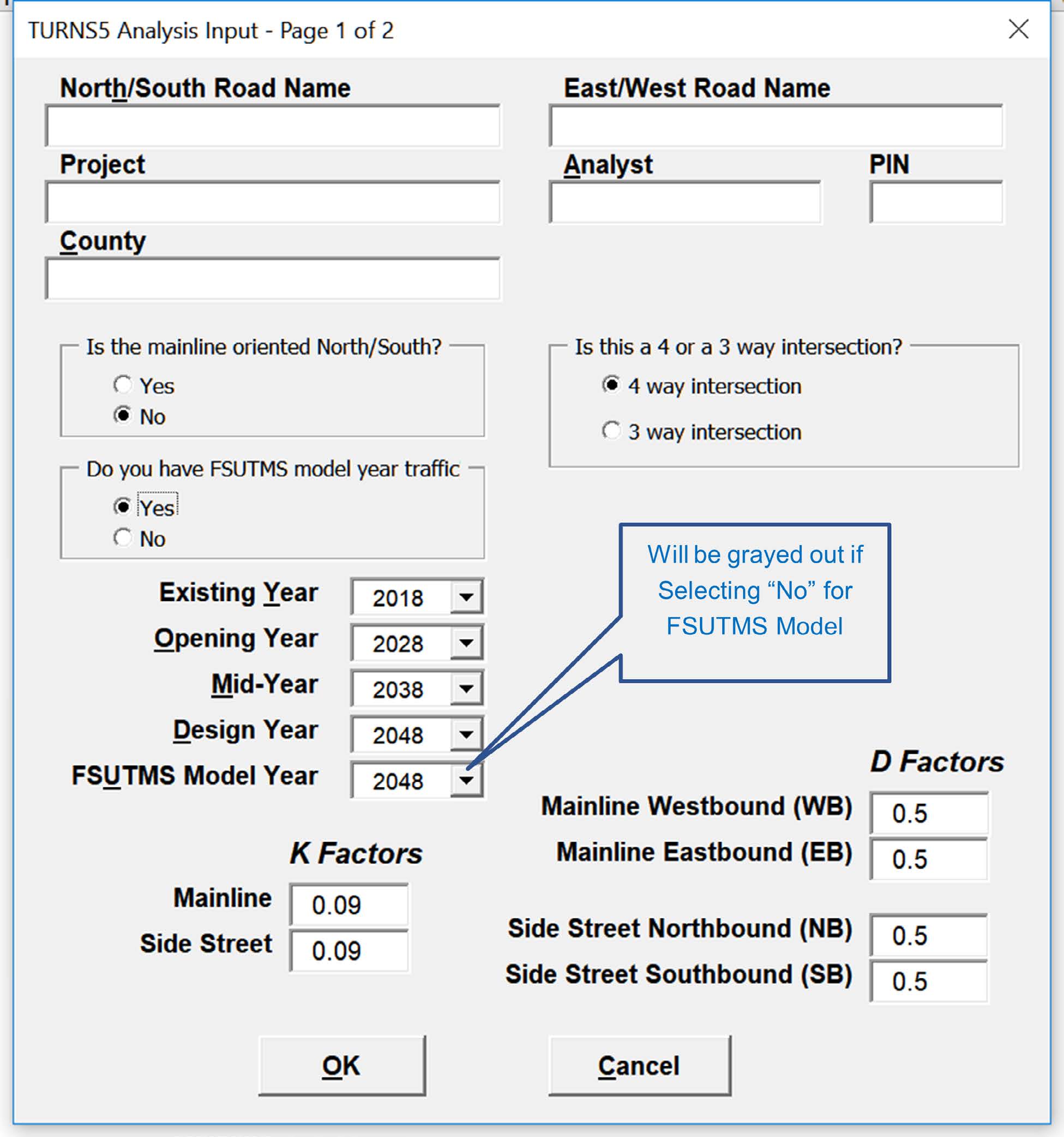
Enter Name of North/South and East/West Roadway names.
Enter Project Description/Name.
Enter Name of the person/firm entering data.
Enter Project Identification Number.
Enter Name of the county where project is located.
Select "Yes" if the mainline is oriented from bottom to top.
Select "No" if the mainline is oriented from left to right.
This selection will also determine the "Highway" and "Intersection" assignment within the "InputSheet" tab. The "Highway" label will be assigned to the mainline while the "Intersection" label will be assigned to the side street.
If a 3-way intersection is chosen, the user must select all 3 approaches that exist at the intersection. The menu will not allow you to proceed until 3 approaches are chosen.
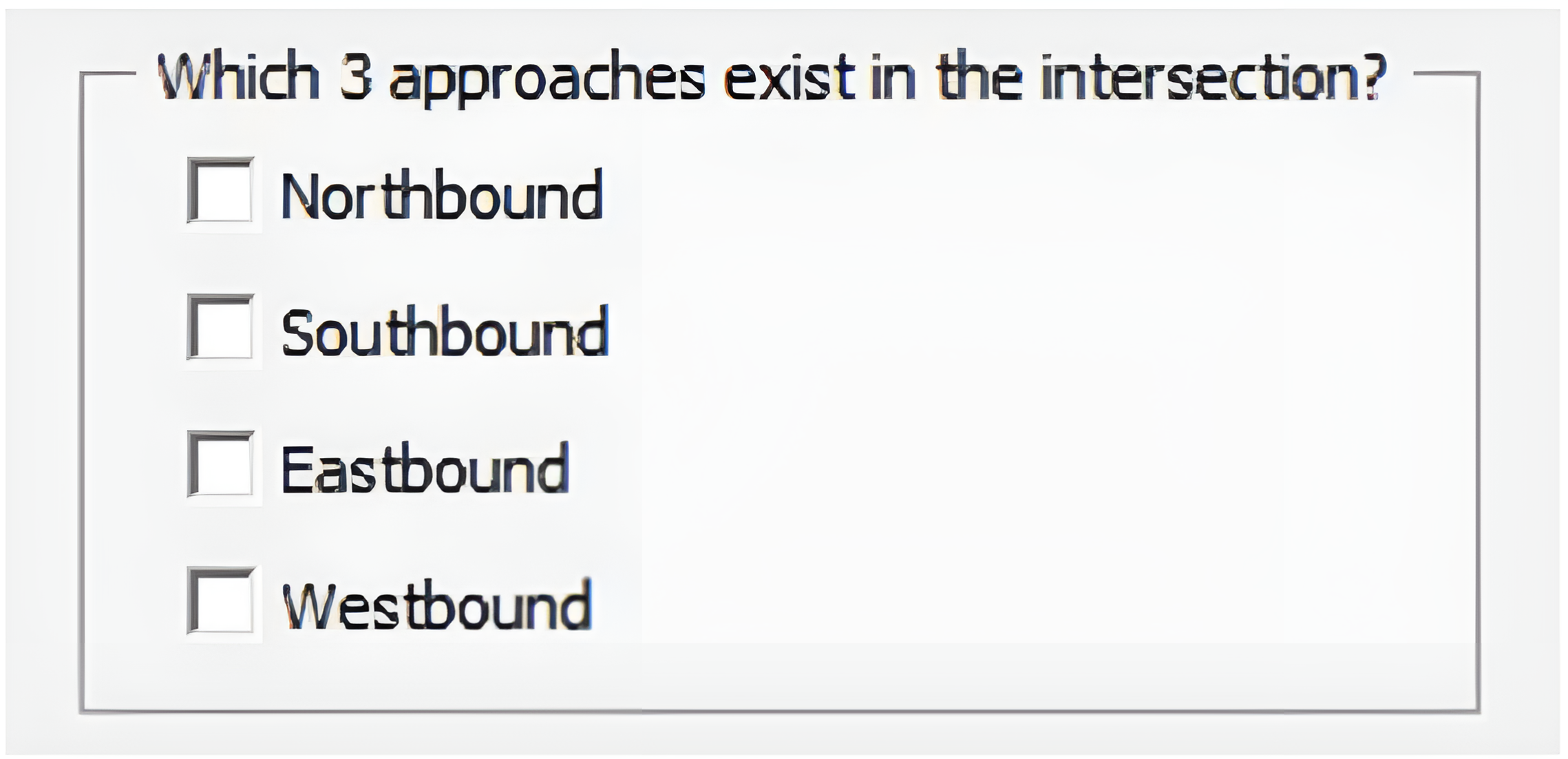
TURNS5-V2014 is not designed to be used for grade-separated interchanges. However, it has been used in some cases to “mimic” single-point urban intersections with manipulation of the movements.
FSUTMS model year traffic available? Select "Yes" or "No". If "Yes" is selected the model year will be required.
Enter Existing Year, Opening Year, Mid-Year and Design Year or FSUTMS Model Year (when Yes is selected above).
Enter K values for Mainline and Side Street. A value between 0.01 and 0.99 must be entered.
Enter D values for Mainline and Side Street. A value between 0.01 and 0.99 must be entered. D values for both directions of mainline and side street must add to one.
Click “OK” to proceed to Page 2 of the “Enter Data” Menu. The information just entered will fill in the ‘InputSheet’ tab. Select “Cancel” to exit the menu.
No information entered into the menu will change the “InputSeet” tab.
7.4.4.2 “Enter Data” Page 2
The “Enter Data” Page 2 is shown in Figure 7-3.
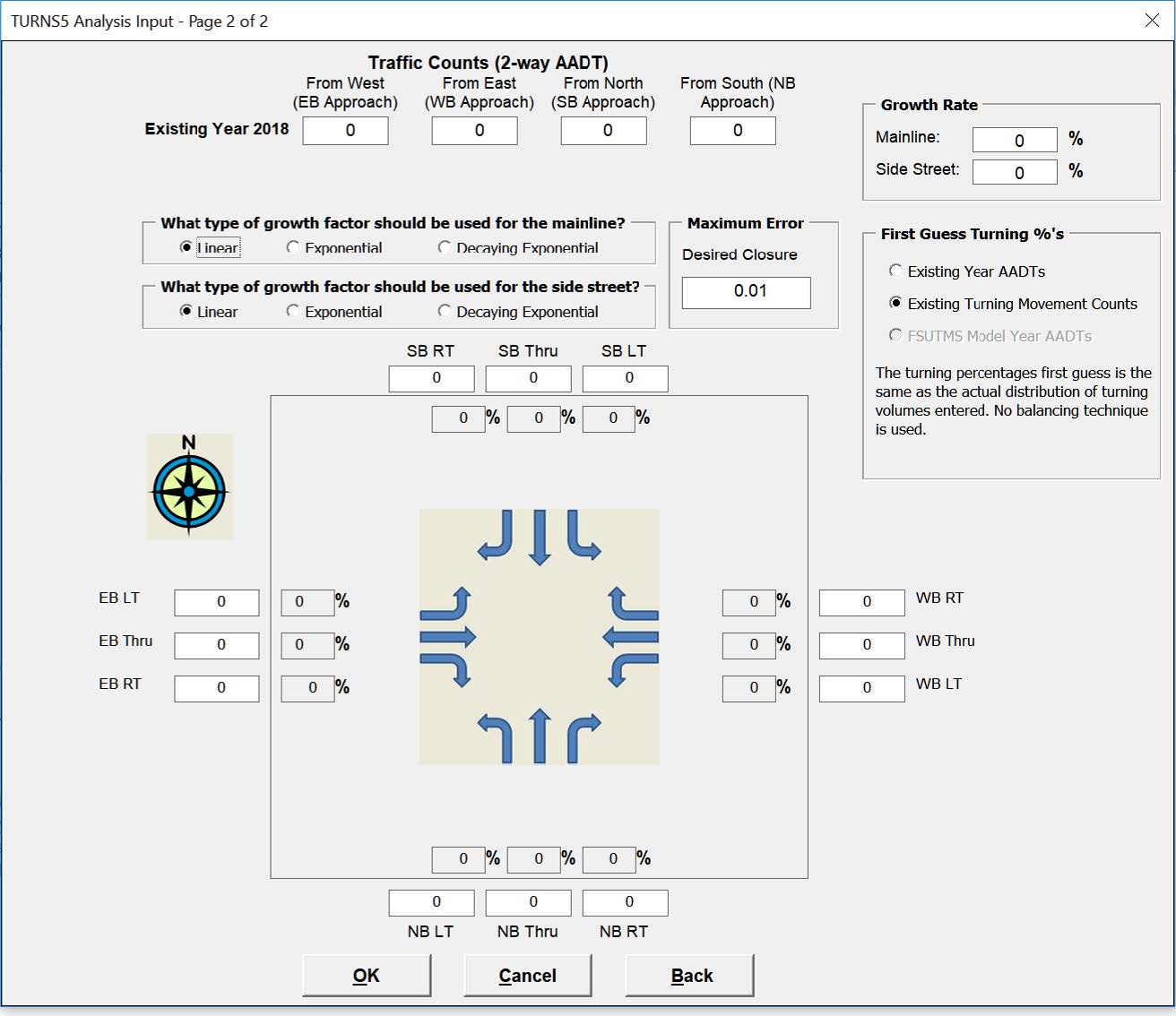
This input tab has to be completed if using FSUTMS Model Year Traffic (chosen from Page 1):
Enter existing year AADTs by direction (approach)
Enter model year FSUTMS AADTs by direction (approach)
This input tab has to be completed if using traffic developed from growth rates (chosen from Page 1):
Enter existing year AADTs by direction (approach)
Enter Growth Rate as a percentage for the Mainline and Side Street
Select type of growth factor to be used for the mainline and side street. Choose from Linear, Exponential, and Decaying Exponential.
User default is 0.01 as the desired closure. Represents the cut- off point for balancing of AADT turning movements in the program.
Note: The value of 0.01 is the maximum tolerance. Values <0.01 may be used but will provide minimal benefit in the balancing calculations. Values >0.01 are not recommended.
Select whether the initial turning percentages are based on Existing Year AADTs, Existing Turning Movement Counts, or FSUTMS Model Year AADTs.
Note: It is recommended that the initial turning percentages be the existing turning movements counts. If existing turning movement counts are not available, then the Existing Year AADTs or FSUTMS Model Year AADTs (if model data is available) options can be utilized.
Existing Year AADTs – The turning movement percentages are based off a ratio of departure volumes calculated from the entered Existing Year AADTs and K and D factors entered in the first page of the menu.
Existing Turning Movement Counts – The actual turning volumes counts are entered into the white text boxes in the appropriate approach, the gray text boxes will automatically update with the value of the turning percentage. This is the FDOT recommended method.
FSUTMS Model Year AADTs – The turning movement percentages are based on a ratio of departure volumes calculated from the entered FSUTMS Model Year AADTs and K
and D factors entered in the first page of the menu.
Click “OK” to finish entering information into the “Enter Data” Menus. The information just entered will fill in the “InputSheet” tab. Select “Cancel” to exit the menu.
No information entered into page 2 of the menu will change the “InputSheet” tab. Select “Back” in order to return to page 1 of the menus. No information entered into page 2 will be saved.
Program Output
The following pages shown in Figures 7-4 to 7-7 will be printed when the “Print Preview and Print” button on the “Main Menu” tab is selected.
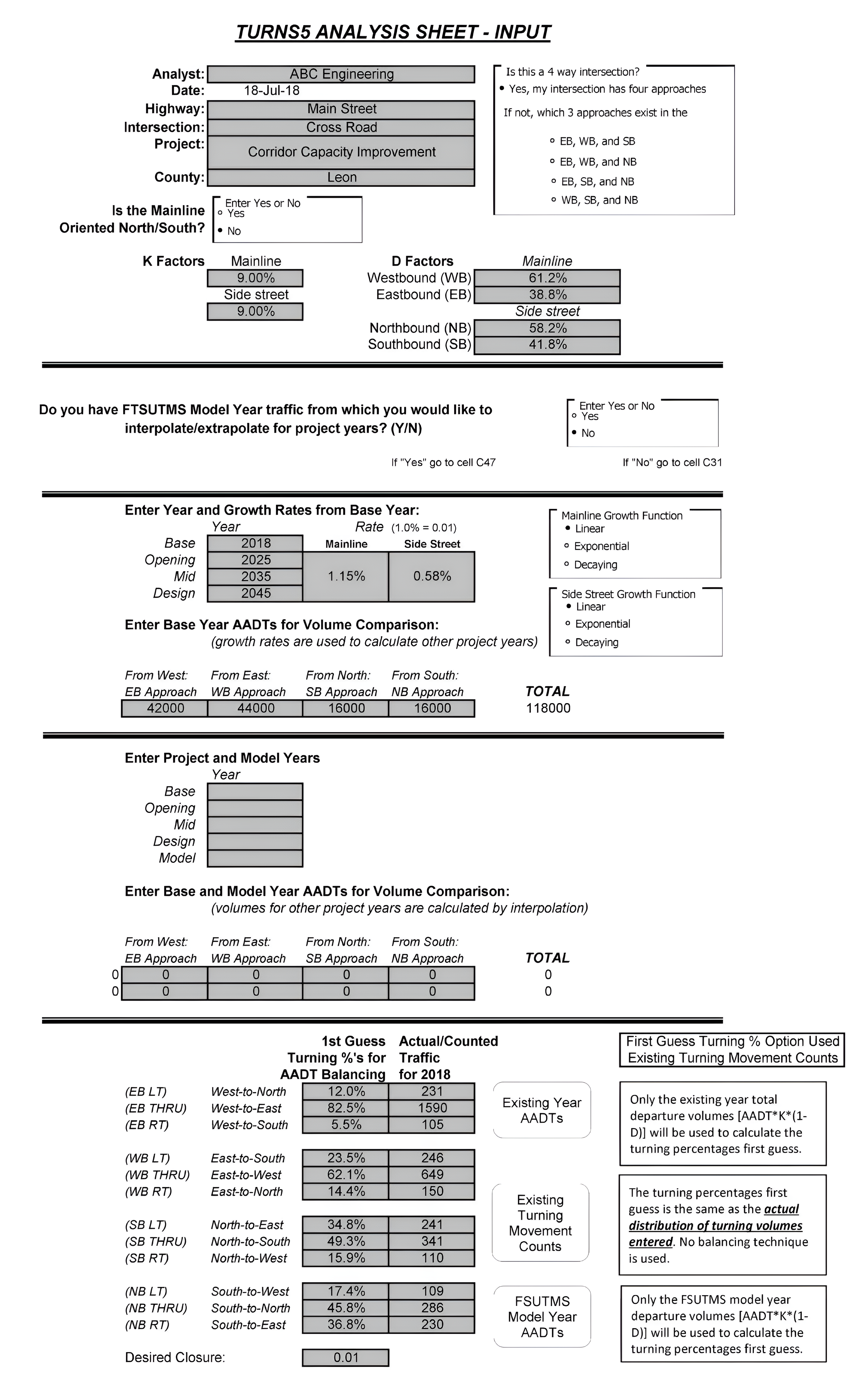
The Input Analysis Sheet shown in Figure 7-4 lists the project information, analysis years, growth rates/type calculations, approach volumes, model information (when applicable), and initial turn percentages for the existing year. The type of first guess turning percentage is also displayed.
Figure 7-5 shows the tabulated output of balanced volumes for each year (Base, Opening, Mid, and Design). The table provides initial (user input) turning percentages, adjusted turning percentages, and DDHVs for each movement.
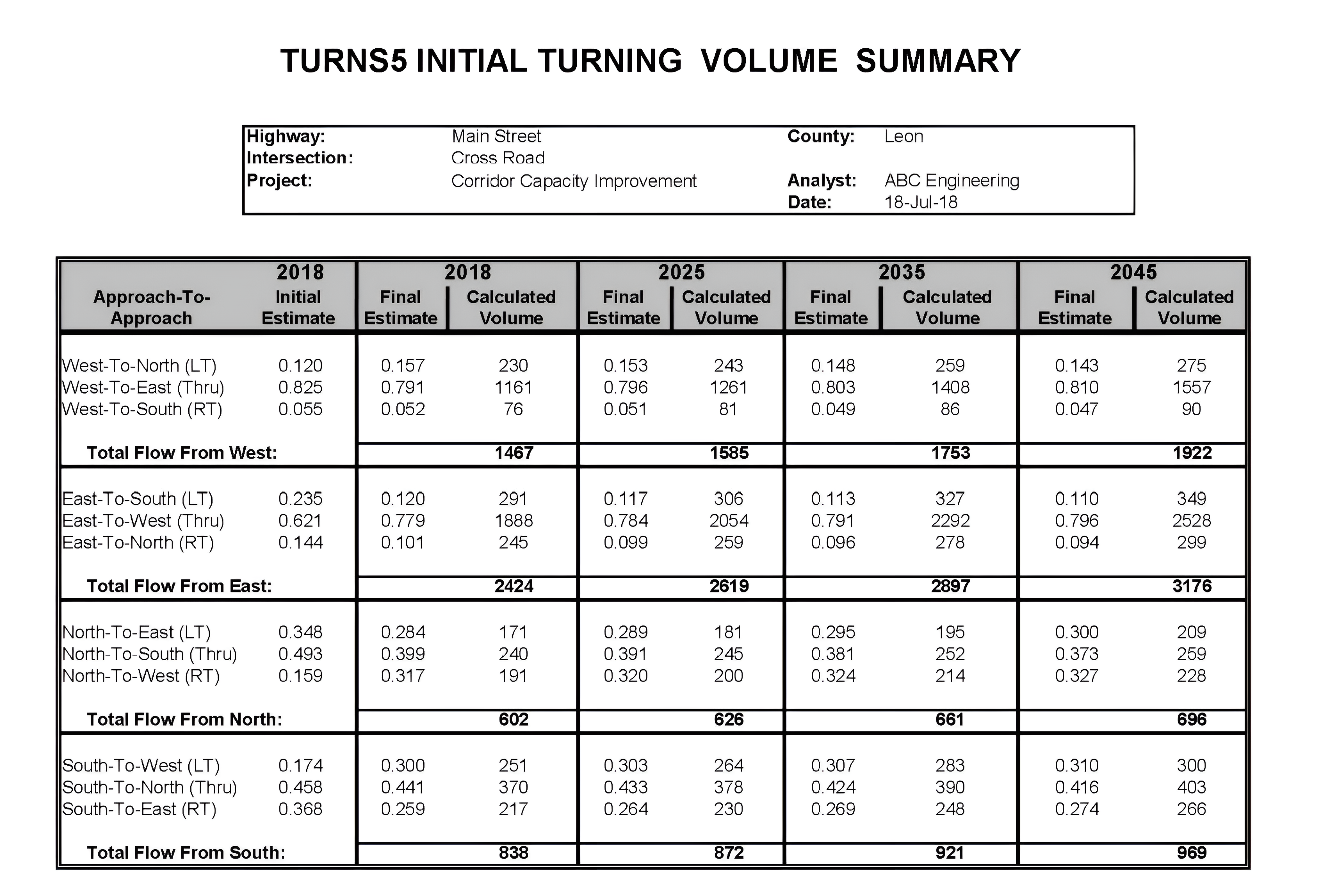
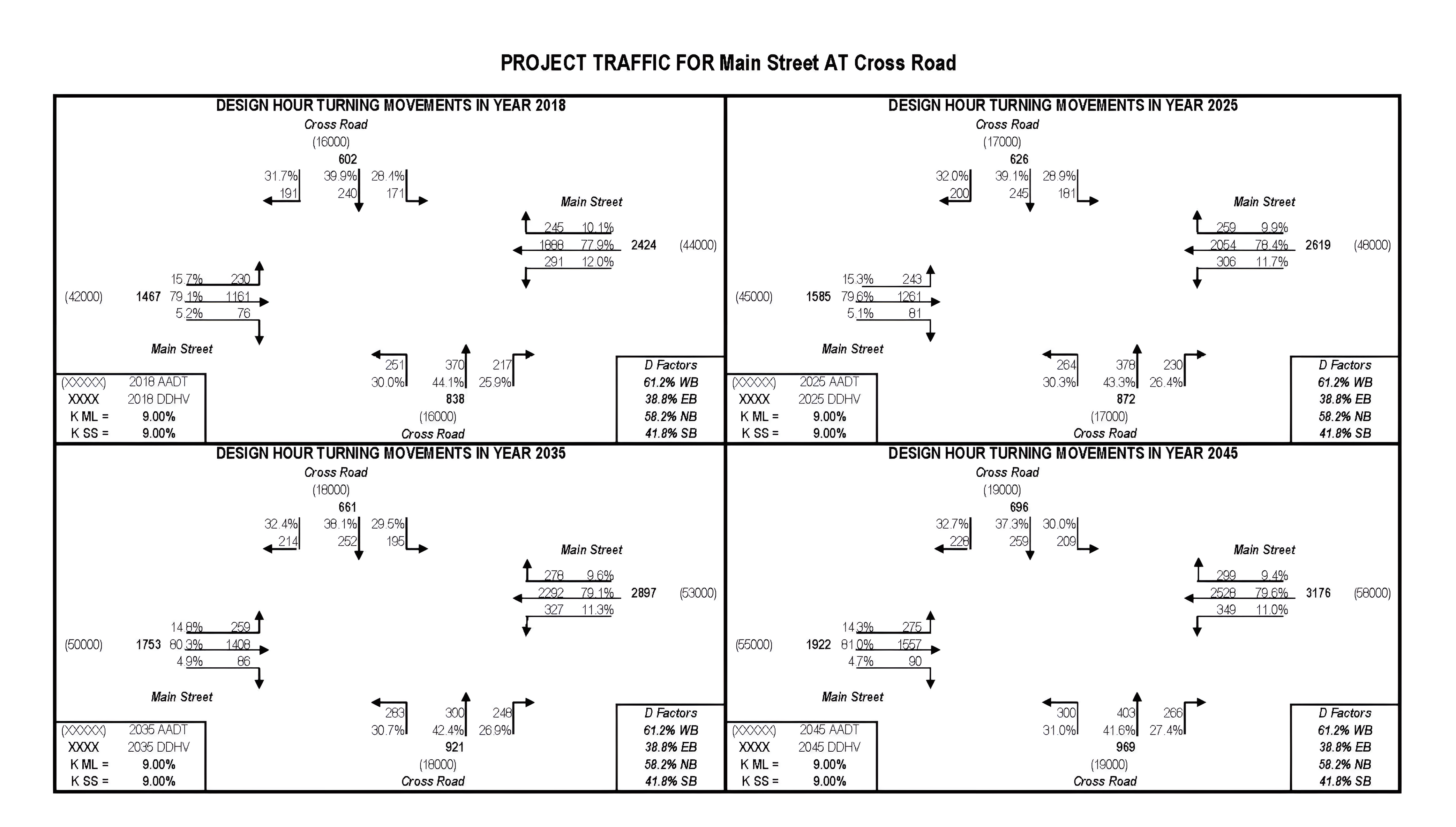
Figure 7-6 shows the turning movement volumes and percentages calculated by the “Run Turn Counts Macro”, DDHVs, AADTs, and the K and D factors used. All four study years are printed.
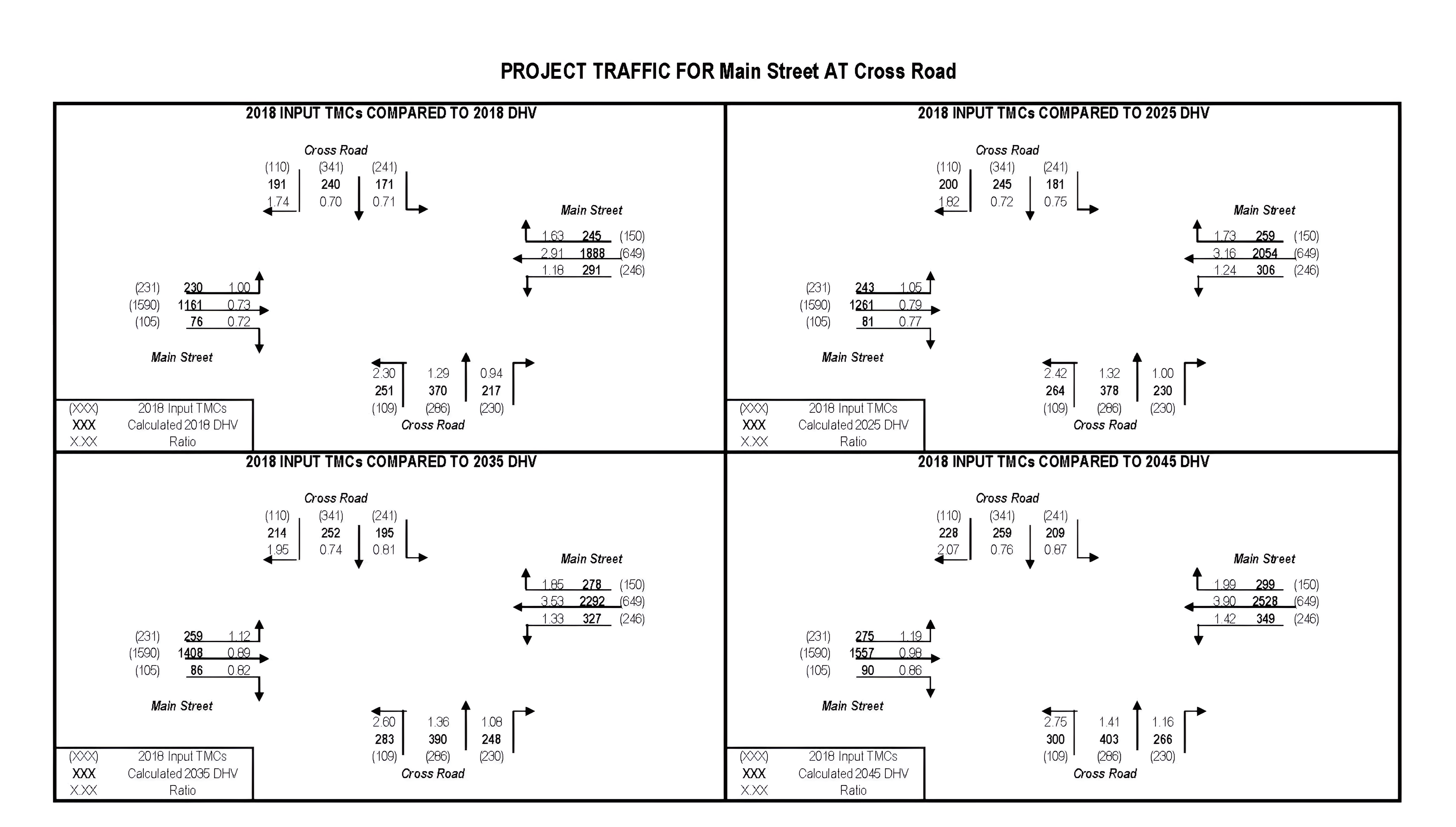
Figure 7-7 shows the comparison between the Base Year turning volumes entered by the users with turning movement volumes calculated by the macro. All four study years are printed.